# 记一次 Rust 内存泄漏排查之旅 | 经验总结篇
Source: https://greptime.cn/blogs/2024-02-21-rust
在某次持续压测过程中,我们发现 GreptimeDB 的 Frontend 节点内存即使在请求量平稳的阶段也在持续上涨,直至被 OOM kill。我们判断 Frontend 应该是有内存泄漏了,于是开启了排查内存泄漏之旅。
## Heap Profiling
大型项目几乎不可能只通过看代码就能找到内存泄漏的地方。所以我们首先要对程序的内存用量做统计分析。幸运的是,GreptimeDB 使用的 [jemalloc 自带 heap profiling](https://github.com/jemalloc/jemalloc/wiki/Use-Case%3A-Heap-Profiling),我们也[支持了导出 jemalloc 的 profile dump 文件](https://github.com/GreptimeTeam/greptimedb/blob/develop/src/common/mem-prof/README.md)。于是我们在 GreptimeDB 的 Frontend 节点内存达到 300MB 和 800MB 时,分别 dump 出了其内存 profile 文件,再用 jemalloc 自带的 `jeprof` 分析两者内存差异(`--base` 参数),最后用火焰图显示出来:
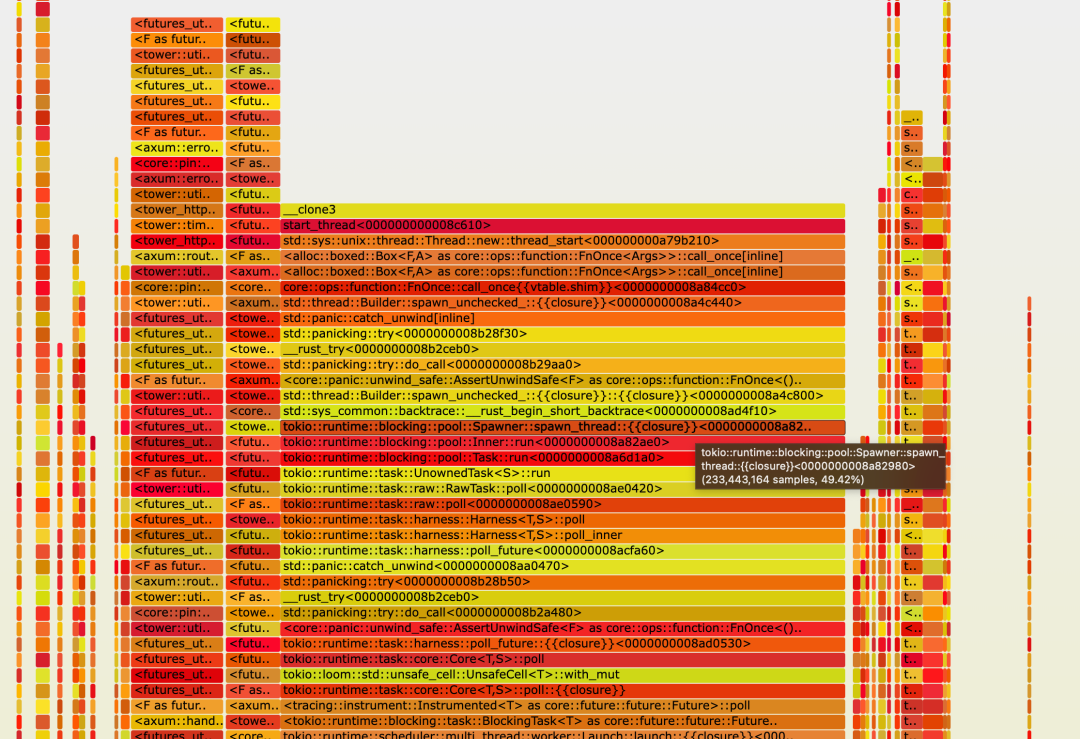
显然图片中间那一大长块就是不断增长的 500MB 内存占用了。仔细观察,居然有 thread 相关的 stack trace。难道是创建了太多线程?简单用 `ps -T -p` 命令看了几次 Frontend 节点的进程,线程数稳定在 84 个,而且都是预知的会创建的线程。所以“线程太多”这个原因可以排除。
再继续往下看,我们发现了很多 Tokio runtime 相关的 stack trace,而 Tokio 的 task 泄漏也是常见的一种内存泄漏。这个时候我们就要祭出另一个神器:[Tokio-console](https://github.com/tokio-rs/console)。
## Tokio Console
Tokio Console 是 Tokio 官方的诊断工具,输出结果如下:
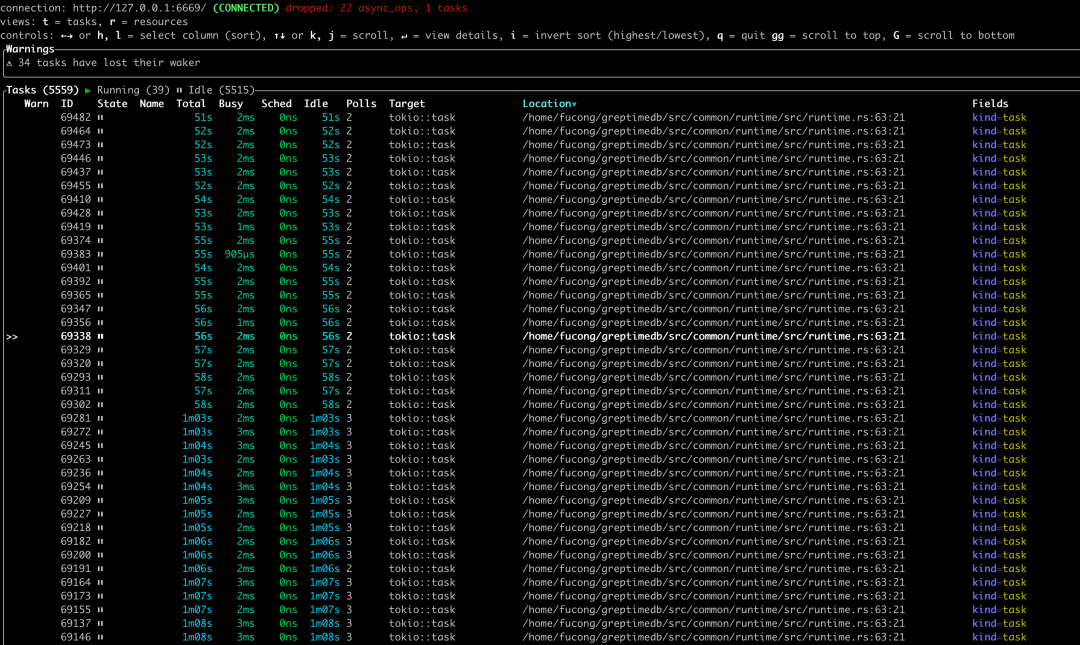
我们看到居然有 5559 个正在运行的 task,且绝大多数都是 Idle 状态!于是我们可以确定,内存泄漏发生在 Tokio 的 task 上。
现在问题就变成了:GreptimeDB 的代码里,哪里 spawn 了那么多的无法结束的 Tokio task?
从上图的 "Location" 列我们可以看到 task 被 spawn 的[地方](https://github.com/GreptimeTeam/greptimedb/blob/develop/src/common/runtime/src/runtime.rs#L63):
```rust
impl Runtime {
/// Spawn a future and execute it in this thread pool
///
/// Similar to Tokio::runtime::Runtime::spawn()
pub fn spawn(&self, future: F) -> JoinHandle
where
F: Future + Send + 'static,
F::Output: Send + 'static,
{
self.handle.spawn(future)
}
}
```
接下来的任务是找到 GreptimeDB 里所有调用这个方法的代码。
## `..Default::default()`!
经过一番看代码的仔细排查,我们终于定位到了 Tokio task 泄漏的地方,并在 [PR #1512](https://github.com/GreptimeTeam/greptimedb/pull/1512) 中修复了这个泄漏。简单地说,就是我们在某个会被经常创建的 struct 的构造方法中,spawn 了一个可以在后台持续运行的 Tokio task,却未能及时回收它。对于资源管理来说,在构造方法中创建 task 本身并不是问题,只要在 `Drop` 中能够顺利终止这个 task 即可。而我们的内存泄漏就坏在忽视了这个约定。
这个构造方法同时在该 struct 的 `Default::default()` 方法当中被调用了,更增加了我们找到根因的难度。
Rust 有一个很方便的,可以用另一个 struct 来构造自己 struct 的方法,即 "[Struct Update Syntax](https://doc.rust-lang.org/book/ch05-01-defining-structs.html#creating-instances-from-other-instances-with-struct-update-syntax)"。如果 struct 实现了 `Default`,我们可以简单的在 struct 的 field 构造中使用 `..Default::default()`。如果 `Default::default()` 内部有 “side effect”(比如我们本次内存泄漏的原因——创建了一个后台运行的 Tokio task),一定要特别注意:struct 构造完成后,`Default` 创建出来的临时 struct 就被丢弃了,一定要做好资源回收。
例如下面这个小例子:([Rust Playground](https://play.rust-lang.org/?version=stable&mode=debug&edition=2021&gist=c121ffd32d2ff0fa8e1241a62809bcef))
```rust
struct A {
i: i32,
}
impl Default for A {
fn default() -> Self {
println!("called A::default()");
A { i: 42 }
}
}
#[derive(Default)]
struct B {
a: A,
i: i32,
}
impl B {
fn new(a: A) -> Self {
B {
a,
// A::default() is called in B::default(), even though "a" is provided here.
..Default::default()
}
}
}
fn main() {
let a = A { i: 1 };
let b = B::new(a);
println!("{}", b.a.i);
}
```
struct A 的 `default` 方法是会被调用的,打印出 `called A::default()`。
## 总结
- 排查 Rust 程序的内存泄漏,我们可以用 jemalloc 的 heap profiling 导出 dump 文件;再生成火焰图可直观展现内存使用情况。
- Tokio-console 可以方便地显示出 Tokio runtime 的 task 运行情况;要特别注意不断增长的 idle tasks。
- 尽量不要在常用 struct 的构造方法中留下有副作用的代码。
- `Default` 只应该用于值类型 struct。

### 关于 Greptime:
Greptime 格睿科技于 2022 年创立,目前正在完善和打造时序数据库 GreptimeDB,格睿云 GreptimeCloud 和可观测工具 GreptimeAI 这三款产品。
GreptimeDB 是一款用 Rust 语言编写的时序数据库,具有分布式、开源、云原生和兼容性强等特点,帮助企业实时读写、处理和分析时序数据的同时降低长期存储成本;GreptimeCloud 可以为用户提供全托管的 DBaaS 服务,能够与可观测性、物联网等领域高度结合;GreptimeAI 为 LLM 量身打造,提供成本、性能和生成过程的全链路监控。
GreptimeCloud 和 GreptimeAI 已正式公测,欢迎关注公众号或官网了解最新动态!
GitHub: https://github.com/GreptimeTeam/greptimedb
文档:https://docs.greptime.cn/
Twitter: https://twitter.com/Greptime
Slack: https://greptime.com/slack
LinkedIn: https://www.linkedin.com/company/greptime/