
本页内容
Introduction
GreptimeDB is an open-source, cloud-native observability database purpose-built for metrics, logs, and traces. It delivers real-time insights at any scale, from edge to cloud.
To meet varying ingestion requirements, the GreptimeDB Java client offers two APIs:
- Regular Insert API: Optimized for low-latency writes, ideal for real-time scenarios.
- Bulk Stream Insert API: Optimized for high-throughput writes, tailored for batch ingestion.
In this article, we’ll take a deep dive into the Bulk API—covering its design, usage patterns, performance tuning options—and compare its throughput against the Regular API.
GreptimeDB Java Ingester
The GreptimeDB Ingester for Java is a lightweight, high-performance client designed for efficient time-series data ingestion. It leverages the gRPC protocol to provide a non-blocking, purely asynchronous API that delivers exceptional throughput while maintaining seamless integration with your applications.
Architecture Overview
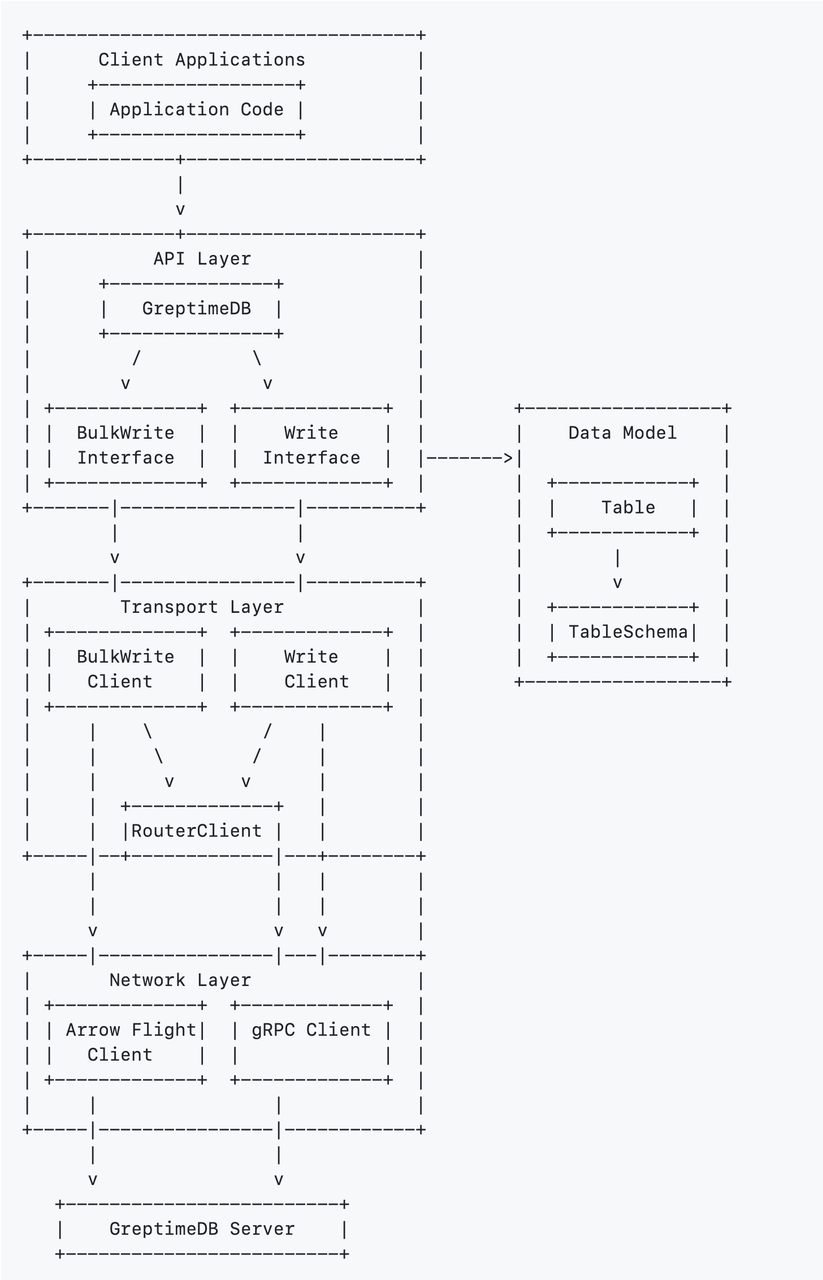
- API Layer: Provides high-level interfaces for client applications to interact with GreptimeDB.
- Data Model: Defines the structure and organization of time series data with tables and schemas.
- Transport Layer: Handles communication logistics, request routing, and client management.
- Network Layer: Manages low-level protocol communications using Arrow Flight and gRPC.
Creating a Client
The entry point is the GreptimeDB class. A client instance is created via the static create method, configured once and reused globally:
java
String database = "public";
String[] endpoints = {"127.0.0.1:4001"};

GreptimeOptions opts = GreptimeOptions.newBuilder(endpoints, database)
        .build();

// Initialize the client
GreptimeDB client = GreptimeDB.create(opts);
Writing Data: Overview
All writes are built on the Table abstraction. The workflow:
- Define a
TableSchema. - Create a
Tablefrom the schema. - Insert rows and commit.
⚠️ Notes:
Tableinstances are immutable after completion and cannot be reused.TableSchemacan be reused and should be, to minimize overhead.
Example:
java
// Define schema
TableSchema schema = TableSchema.newBuilder("metrics")
    .addTag("host", DataType.String)
    .addTag("region", DataType.String)
    .addField("cpu_util", DataType.Float64)
    .addField("memory_util", DataType.Float64)
    .addTimestamp("ts", DataType.TimestampMillisecond)
    .build();

// Create a table
Table table = Table.from(schema);

// Insert rows
table.addRow("host1", "us-west-1", 0.42, 0.78, System.currentTimeMillis());
table.addRow("host2", "us-west-2", 0.46, 0.66, System.currentTimeMillis());

// Finalize table
table.complete();
Regular Insert API
Best suited for: real-time apps, IoT sensors, and interactive systems.
Characteristics:
- Latency: sub-millisecond
- Throughput: 1k–10k rows/sec
- Network model: request-response
- Memory: lightweight, but may run out of memory under high concurrency.
Example:
java
// Add rows to the table
for (int row = 0; row < 100; row++) {
    Object[] rowData = generateRow(batch, row);
    table.addRow(rowData);
}

// Write the table to the database
CompletableFuture<Result<WriteOk, Err>> future = client.write(table);
Bulk Stream Insert API for High Throughput
The Bulk API enables large-scale ingestion with maximum throughput and memory efficiency, leveraging off-heap memory management for optimized batching.
Best suited for: ETL pipelines, data migration, batch ingestion, and log collection.
Characteristics:
- Latency: 100–10,000 ms (batching)
- Throughput: >10k rows/sec
- Network model: parallel streaming, one stream per table
- Memory: stable, with built-in backpressure
Key Advantages:
- Parallel processing with multiple in-flight requests
- Streaming transmission via Apache Arrow Flight
- Zstd compression support
- Asynchronous, non-blocking commits
Usage Example of Bulk Insert API
java
// Create a BulkStreamWriter with the table schema
try (BulkStreamWriter writer = greptimeDB.bulkStreamWriter(schema)) {
    // Write multiple batches
    for (int batch = 0; batch < batchCount; batch++) {
        // Get a TableBufferRoot for this batch
        Table.TableBufferRoot table = writer.tableBufferRoot(1000); // column buffer size

        // Add rows to the batch
        for (int row = 0; row < rowsPerBatch; row++) {
            Object[] rowData = generateRow(batch, row);
            table.addRow(rowData);
        }

        // Complete the table to prepare for transmission
        table.complete();

        // Send the batch and get a future for completion
        CompletableFuture<Integer> future = writer.writeNext();

        // Wait for the batch to be processed (optional)
        Integer affectedRows = future.get();

        System.out.println("Batch " + batch + " wrote " + affectedRows + " rows");
    }

    // Signal completion of the stream
    writer.completed();
}
Deep Dive: Bulk API
1. Table Requirements
- Tables must be created ahead of time with SQL DDL.
- No automatic schema evolution.
- No primary key tag columns; each row must provide all columns
2. Configuration Options
The Bulk API optimizes performance with multi-configuration support:
java
BulkWrite.Config cfg = BulkWrite.Config.newBuilder()
        .allocatorInitReservation(64 * 1024 * 1024L) // Custom memory allocation: Initially reserved 64MB
        .allocatorMaxAllocation(4 * 1024 * 1024 * 1024L) // Custom memory allocation: Maximum allocation of 4GB
        .timeoutMsPerMessage(60 * 1000) // Per-request timeout: 60 seconds (Throughput-optimized; moderate latency tolerance recommended)
        .maxRequestsInFlight(8) // Concurrency control: Configured to allow a maximum of 10 concurrent (in-flight) requests
        .build();
// Enable Zstd compression
Context ctx = Context.newDefault().withCompression(Compression.Zstd);

BulkStreamWriter writer = greptimeDB.bulkStreamWriter(schema, cfg, ctx);
3. Performance Tuning Recommendations
- Compression: Zstd (recommended for network I/O bottlenecks)
- Adjust concurrency based on workload (network-bound vs CPU-intensive)
java
// Assuming single instance with single table writing, CPU cores = 4

// Network-Bound Scenario: Bulk Stream Insert primarily waits for network transmission
BulkWrite.Config networkBoundOptions = BulkWrite.Config.newBuilder()
    .maxRequestsInFlight(8)  // Recommended 8-16 to fully utilize network bandwidth
    .build();

// CPU-Intensive Scenario: When significant computation is needed before writing
BulkWrite.Config cpuIntensiveOptions = BulkWrite.Config.newBuilder()
    .maxRequestsInFlight(4)  // Recommended to match number of CPU cores
    .build();

// Mixed Workload: Adjust based on actual bottleneck
BulkWrite.Config balancedOptions = BulkWrite.Config.newBuilder()
    .maxRequestsInFlight(6)  // Balanced between network and CPU constraints
.build();- Tune batch size: In the Ingester system, each table essentially functions as a buffer. Small batches for lower latency, larger batches for higher throughput.
Benchmarking: Bulk vs Regular API
To demonstrate performance differences, we built a simple log ingestion benchmark using greptimedb-ingester-java.
The tool provides TableDataProvider - a high-performance log data generator designed for performance testing. It synthesizes log data with 15 fields to simulate real-world distributed system logging scenarios. The table structure is as follows 👇
Schema:
sql
CREATE TABLE IF NOT EXISTS `my_bench_table` (
  `log_ts` TIMESTAMP(3) NOT NULL,
  `business_name` STRING NULL,
  `app_name` STRING NULL,
  `host_name` STRING NULL,
  `log_message` STRING NULL,
  `log_level` STRING NULL,
  `log_name` STRING NULL,
  `uri` STRING NULL,
  `trace_id` STRING NULL,
  `span_id` STRING NULL,
  `errno` STRING NULL,
  `trace_flags` STRING NULL,
  `trace_state` STRING NULL,
  `pod_name` STRING NULL,
  TIME INDEX (`log_ts`)
)

 ENGINE=mito
Data Characteristics
Key Feature: Large
log_messagefield- Target length: ~2,000 characters
- Content generation: Template-based system that produces different message types depending on log level
Field Cardinality / Dimension Distribution
- High-cardinality fields (nearly unique):
trace_id,span_id: generated using 64-bit random numberslog_ts: based on millisecond-level timestamps
- Low-cardinality fields are not listed here in detail.
- High-cardinality fields (nearly unique):
Run Benchmark Tests
- Start GreptimeDB
- Create the table
- Sequentially run the Bulk API Benchmark and Regular API Benchmark
- Commands:
java
# Bulk API Benchmark
run io.greptime.bench.benchmark.BatchingWriteBenchmark

# Regular API Benchmark
run io.greptime.bench.benchmark.BatchingWriteBenchmark- My local benchmark results are as follows:
| API Type | Throughput | Duration | Improvement |
|---|---|---|---|
| Bulk API | 180,962 rows/s | 27.630 s | 83% |
| Regular API | 98,868 rows/s | 50.572 s | Baseline |
Results show:
- Bulk API achieved ~80% higher throughput.
- Regular API is ideal for low-latency, small-scale workloads.
- Bulk API excels in high-throughput, large-scale ingestion.
Bulk API Result
java
 - === Running Bulk API Log Data Benchmark ===
 - Setting up bulk writer...
 - Starting bulk API benchmark: RandomTableDataProvider
 - Table: my_bench_table (14 columns)
 - Target rows: 5000000
 - Batch size: 65536
 - Parallelism: 4
// Omit irrelevant logs ...
 - → Batch 1: 65536 rows processed (47012 rows/sec)
 - → Batch 2: 131072 rows processed (75199 rows/sec)
// Omit part of the process logs ...
 - → Batch 73: 4784128 rows processed (180744 rows/sec)
 - → Batch 74: 4849664 rows processed (180748 rows/sec)
 - → Batch 75: 4915200 rows processed (180699 rows/sec)
 - Completing bulk write operation, signaling end of transmission
 - Waiting for server to complete processing
 - → Batch 76: 4980736 rows processed (180972 rows/sec)
 - → Batch 77: 5000000 rows processed (181015 rows/sec)

 - Finishing bulk writer and waiting for all responses...
 - All bulk writes completed successfully
 - Cleaning up data provider...
 - Bulk API benchmark completed successfully!
 - === Benchmark Result ===
 - Table: my_bench_table
 -
 - Provider                          Rows Duration(ms)      Throughput     Status
 - --------------------------------------------------------------------------
 - RandomTableDataProvider         5000000        27630       180962 r/s    SUCCESS
Regular API Results
java
 - === Running Batching API Log Data Benchmark ===
 - Setting up batching writer...
 - Starting batching API benchmark: RandomTableDataProvider
 - Table: my_bench_table (14 columns)
 - Target rows: 5000000
 - Batch size: 65536
 - Concurrency: 4
// Omit irrelevant logs ...
 - → Batch 1: 65536 rows processed (17415 rows/sec)
 - → Batch 2: 131072 rows processed (32031 rows/sec)
 // Omit part of the process logs ...
 - → Batch 73: 4784128 rows processed (98586 rows/sec)
 - → Batch 74: 4849664 rows processed (98638 rows/sec)
 - → Batch 75: 4915200 rows processed (98776 rows/sec)
 - → Batch 76: 4934464 rows processed (97574 rows/sec)
 - Finishing batching writer and waiting for all responses...
 - → Batch 77: 5000000 rows processed (98868 rows/sec)
 - All batching writes completed successfully
 - Cleaning up data provider...
 - Batching API benchmark completed successfully!
 - === Benchmark Result ===
 - Table: my_bench_table
 -
 - Provider                          Rows Duration(ms)      Throughput     Status
 - --------------------------------------------------------------------------
 - RandomTableDataProvider         5000000        50572        98868 r/s    SUCCESS
Choosing the Right API
Conclusion
GreptimeDB provides two complementary ingestion approaches:
- Regular API: low-latency, suited for real-time, small-scale ingestion.
- Bulk API: high-throughput, suited for large-scale batch ingestion and log processing.
By choosing the right API—or combining both—developers can achieve optimal scalability and performance across a wide range of workloads.


